
A HEAD probe succeeds through the proxy, but the application's GET still fails. That is not a contradiction: HEAD checks a response without transferring the resource body, while GET exercises the content path your worker actually needs. Use a controlled four-request comparison before declaring the proxy healthy or broken.
This procedure is for an owned diagnostic endpoint or an explicitly authorized test target. It is a test design, not a claim of measured 98IP results. Start with a tiny harmless fixture; do not use a large production download or a state-changing URL as a health probe.
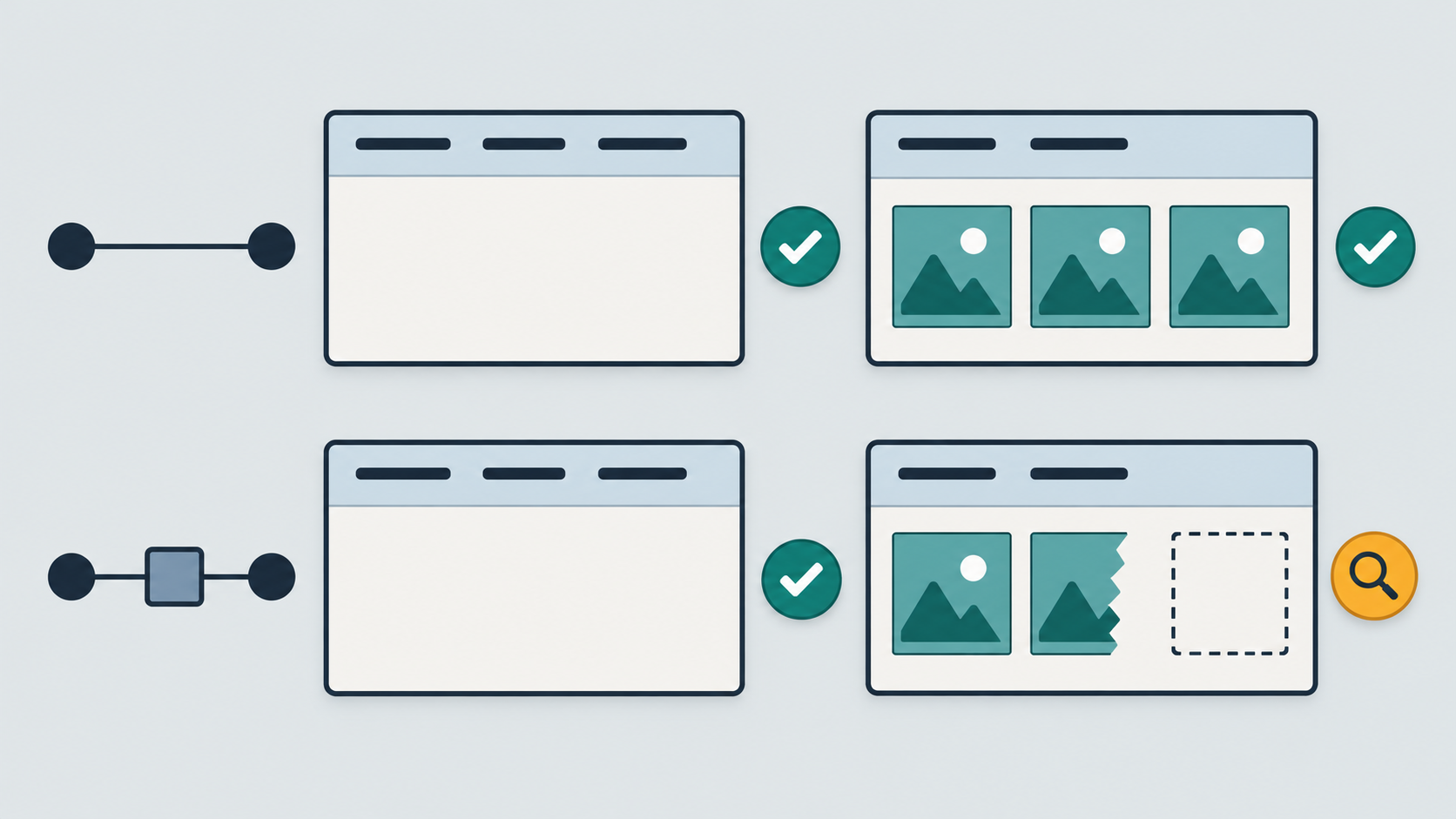
1. Understand what a HEAD success proves
A valid HEAD response has no response content. Its representation metadata describes what a corresponding GET would return. A nonzero Content-Length on HEAD therefore does not mean that those body bytes should arrive during the HEAD request. Reporting zero received body bytes as truncation would create a false failure.
Conversely, HEAD returning 200 does not validate the GET body, its business marker, decoding, or full transfer. For HTTPS through an HTTP proxy, distinguish the proxy's CONNECT response from the target's final HTTP response as well. A successful tunnel handshake alone is not the target resource's success.
2. Prepare one small resource with a clear contract
Create a read-only test resource under your control with a fixed small body, a known marker, and a documented successful GET response. Record the exact expected content and chosen representation. Keep the fixture unchanged during the comparison. Do not use a page that can randomly become a login screen or vary by account state without documenting that behavior.
Agree whether the endpoint supports HEAD. Freeze the client version, HTTP version setting, authentication context, language, content negotiation, redirect policy, and observation deadline. Avoid conditional and Range headers in this initial fixture test so that a cache validation or partial response does not silently change the question. Record any cache layer that still participates.
3. Run the four cells explicitly
- Baseline HEAD: request metadata from the fixture without the residential proxy. Confirm that the diagnostic process has no unintended environment proxy or automatic fallback path.
- Baseline GET: use an equivalent clean client invocation and retrieve the complete small fixture. Keep headers and permitted identity context equivalent, apart from the method and necessary method-specific handling.
- Proxy HEAD: repeat the metadata request through the intended endpoint, protocol, and proxy authentication mode. Record both proxy negotiation and the final target response.
- Proxy GET: repeat the full small-body request through the same configured route and session policy. Record the actual observed route where your test setup exposes it; a configured session label is not itself proof of a fixed exit.
Keep each response and its run ID separate. Use fresh, equivalently prepared connections for this first comparison so connection reuse is not another hidden variable. If your real application depends on a warm connection pool, add that as a separately labeled follow-up after the basic matrix is understood.
Review the 98IP residential proxy options when choosing the route and session configuration for this test. Confirm the actual account settings and supported protocol before running. The website testing use case is relevant here, but neither page guarantees that every target handles HEAD and GET identically or that a particular client has been certified.
4. Make sure the client really performs each method
For curl, use its dedicated --head option for the HEAD case. Merely changing the method token with -X HEAD does not configure curl's full HEAD handling and can produce misleading behavior. For the GET cell, use a separate clean invocation without --head or an unintended custom method, and inspect the method actually sent using safe client evidence or your owned server logs.
Some tools follow redirects automatically, and saved configuration can change methods or authentication context. Record the redirect chain and final method rather than comparing only the last status. Do not copy unredacted verbose traces into tickets: they can contain credentials, cookies, or sensitive URLs.
5. Judge metadata and content separately
For HEAD, record the final target status, selected representation metadata, and whether the endpoint behaves according to its stated method support. HTTP semantics allow a server to omit certain fields whose values are determined only while generating content. Do not require every HEAD header to be byte-for-byte identical to a later dynamic GET response.
For the fixture GET, require the expected status, media type, complete known body, and marker. Record the client outcome and any body decoding error. Compare like representations; compressed transfer bytes and decoded text length are different measurements. If you intentionally test a GET whose status has no content, such as 204 or 304, use that status's separate contract rather than this body-bearing fixture's rule.
A timeout, an authentication failure, and a complete but wrong login document are three different GET failures. A successful HEAD cannot turn any of them into a pass. Keep the evidence narrow enough to identify which stage failed.
6. Interpret the matrix without an automatic IP verdict
- HEAD fails on both routes while GET passes: investigate the endpoint's HEAD support or method-specific policy. An unsupported method is not proof that the proxy cannot deliver the real GET workload.
- Both HEAD cells pass, but only proxy GET fails: investigate that GET's authentication, redirect, transfer, decoding, and target-side evidence. HEAD did not exercise the missing body path.
- Both GET cells fail similarly: inspect the fixture and application contract before attributing the issue to a proxy region.
- Only proxy HEAD fails while proxy GET passes: investigate method-specific handling along that route. Decide whether the probe needs correction instead of withdrawing a working GET path.
These patterns select the next investigation, not the root cause. Preserve the four results and change one condition at a time. Do not repeatedly change the exit IP and method together, because a passing retry would then explain neither variable.
7. Prove the health check can detect false success
In an isolated owned fixture, rehearse three cases: reject HEAD while keeping the expected GET healthy; allow HEAD metadata but return a wrong marker on GET; and allow HEAD while deliberately interrupting the fixture GET body using controlled test tooling. The check should distinguish unsupported probe behavior, wrong content, and incomplete transfer. These are proposed exercises, not tests claimed to have been executed here.
Restore normal fixture behavior and rerun the same matrix. If you retain HEAD as a lightweight monitor, label it a metadata probe and pair it with a bounded representative GET check where appropriate. Select the interval and request budget from your workload and target permission; this guide supplies no universal safe rate or measured cost saving.
FAQ and acceptance checklist
Why does HEAD show Content-Length but download no body? That can be normal: the metadata refers to the corresponding GET representation.
Can HEAD replace every GET health check? No. It cannot prove the content path or business result. Conversely, HEAD failing does not automatically invalidate a working GET path.
- The tiny owned fixture and supported methods are documented.
- Baseline and proxy HEAD/GET cells have separate run IDs and equivalent controls.
- The actual final method, target response, and proxy negotiation are distinguished.
- HEAD has a metadata decision; GET has its own content decision.
- Controlled false-success cases are detectable and the restored fixture passes.
Use only authorized endpoints and identities, keep probes small and bounded, and respect application limits. Redact secrets and session data from evidence. Successful diagnostics do not grant permission to access a target resource outside the approved scope.
Related Recommendations
- How to Test Proxy Keep-Alive Without Breaking IP Rotation
- Two Localized Submit Buttons, One Wrong Action? Test the Submitter
- Browser Proxy Bandwidth Budgeting: Measure Cost Before You Scale
- HTTP 408 Through a Proxy or a Client Timeout? Collect the Right Evidence
- How to Test Proxy Header Size Limits Before Large Cookies Break Production
- Playwright Proxy Configuration Guide: Authentication, Isolation and Debugging
- How to detect unexpected direct fallback after agent failure
- Proxy Connection Pooling: Performance, Reuse, and Isolation
- Proxy Extraction API Returns No Endpoints? Separate Empty Results from Errors
- Proxy Exit IP Allowlist Rollover: A Zero-Downtime Migration Runbook