
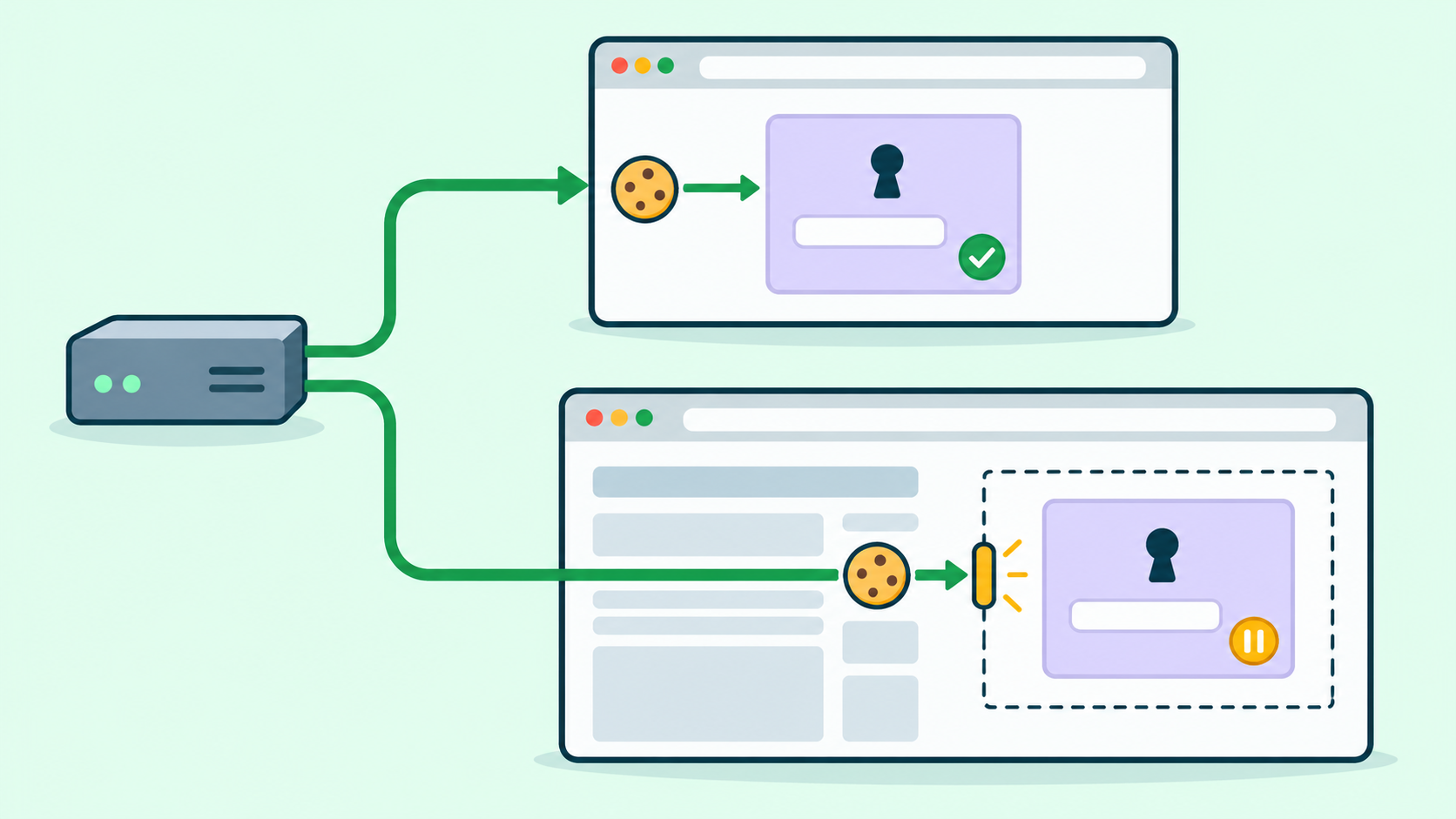
A working route can still show a signed-out widget
An authorized regional website test may open a sign-in component successfully as a top-level page, yet show a login loop or signed-out state when the same component is embedded. Do not call this a bad proxy IP before checking whether the browser and application can use the expected session in that context.
Third-party cookie handling varies with browser policy and settings. Cookie attributes also affect eligibility, and SameSite=None with Secure is not a universal override of browser restrictions. These distinctions are described in browser documentation. The workflow below tests your owned or explicitly authorized integration; it does not claim one result for every browser or website.
1. Specify the two sites and the expected identity
Use a harmless fixture: Site A embeds the sign-in component from Site B, and both are controlled by you or covered by the test agreement. If the purpose is a cross-site test, use actual distinct sites rather than assuming different hostnames automatically create that condition. Define the expected non-sensitive signed-in marker and the permitted authentication flow.
Record browser version, profile type, privacy and enterprise settings, extensions, consent state, language and market. Keep these fixed across route comparisons. Use approved test identities with equivalent permissions; account session limits or simultaneous-login invalidation must not become an uncontrolled difference between cases.
2. Prepare each route as a paired session test
For a permitted direct baseline, start a fresh test profile, sign in to B as a top-level page using the approved flow, and verify the harmless identity marker. Within that same profile, open A and inspect embedded B. The purpose is to change the browsing context while keeping the prepared session, not to open the embedded case in a new empty profile.
Repeat the pair with the intended proxy configuration in a separate equally prepared profile. Confirm route evidence for A and B where applicable. Record preparation and test times because a session may expire between steps. If direct access is outside the agreement or unavailable, omit that pair and report the baseline as unavailable rather than inventing a comparison.
3. Establish whether the frame is allowed to load
First inspect the embedded document request, final destination and browser console. A frame blocked by embedding policy or an incorrect sandbox configuration is a different failure from a loaded document that cannot use its session. Confirm which stage actually completed before investigating cookies.
A top-level document returning 200 does not demonstrate that the embedded request reached the same document. A loaded frame may also return 200 for a login or error page. Use the fixture's expected content and server-side test identity evidence, not just status or a successful load event.
4. Inspect cookie decisions without copying secrets
In the browser's network and storage tools, record whether the relevant response attempted to set a cookie, whether the browser accepted it, and whether the subsequent embedded request sent the expected session reference. Capture attribute names and the browser's blocked or partitioned-state explanation where available; redact values and tokens.
Review Domain, Path, expiry, Secure and SameSite against the application's intended context. HttpOnly prevents script access; an empty document.cookie result is therefore not evidence that an authentication cookie is absent. Do not make the cookie script-readable to simplify the test. A cookie stored in one context is not by itself proof that the embedded request used it.
5. Interpret the paired results conservatively
Top-level and embedded cases both fail only on the proxy route: investigate reachability, route selection and the target's authorized source policy before assuming a cookie fault. Top-level works while embedded fails on both routes: investigate embedding or session-context behavior first, with browser evidence to identify the cause.
Top-level works on both routes but embedded fails only on one: compare redirect destinations, actual site context, consent and response cookie attributes before attributing the difference to the route. This pattern is a lead, not a proof. If the session reference was sent but the component still shows signed out, inspect expiry and application authorization at B.
Record unavailable evidence explicitly. No blocked-cookie message does not prove cookies are usable, and changing exits does not change a browser's privacy policy. Work with the site owner on its supported authentication or storage-access design; do not treat disabling protections globally as a production fix.
6. Rehearse three distinguishable failure states
On owned fixtures, prepare a frame intentionally refused by the host policy, a loaded frame whose session is unavailable under the recorded test policy, and a loaded frame returning the wrong test-identity marker. Keep the expected outcome for each separate. This is a proposed acceptance exercise, not a claim that these tests have already run on a 98IP route.
The report should identify route and browser profile, top-level preparation result, frame-request outcome, cookie set/store/send observations, browser reason, and expected versus observed marker. After an approved fix, repeat in a clean prepared profile under normal production-intended settings and confirm that session behavior and route evidence both match the test agreement.
Where 98IP fits
Use 98IP dynamic residential IP when the approved test needs selected residential markets. The website testing use case is relevant for checking your regional integration, but routing does not grant a frame session access or override browser privacy decisions.
Use only account-supported connection options and verify the observed route. A proxy cannot guarantee that a third-party identity component permits embedding, that cookies will be shared, or that an application accepts a source. Diagnose those requirements separately rather than promising that a new IP repairs authentication.
FAQ and release checklist
Should I copy cookies from the successful profile into the failing one? No. Prepare each pair through its approved login flow; copying secrets changes the experiment and exposes session material.
Does SameSite=None guarantee embedded login? No. It addresses a cookie attribute requirement; browser policy, context and application design still matter.
Before release: real site relationship documented; profiles and identity permissions comparable; session prepared before embedding; frame-load and cookie failures distinct; cookie values absent from evidence; final identity marker correct; normal settings retested; unknowns visible.
Test only owned or expressly authorized components with test identities. Honor consent, access limits and data-retention requirements. Avoid genuine user sessions, never collect passwords or cookie values in shared reports, and do not use route changes to evade a denial.
Related Recommendations
- NO_PROXY Configuration Guide: Domains, Ports, CIDR, and Safe Bypass Rules
- How to change the IP address of a router: This setting can easily optimize the network
- How to Diagnose Stale DNS During a Proxy Gateway Rollover
- New Proxy Region, Same Saved Market? Test localStorage Preference Priority
- How to Test OpenSSL Provider Lifetime in Pooled libcurl Connections
- How to Test a Proxy for DNS Leaks Before You Buy
- Audit Proxy Data Residency Before You Buy: A Vendor Evidence Playbook
- Proxy Browser Tests and Webhooks: Verify the Callback on Its Own Path
- How to Audit HTTP/2 Server Push Cleanup in Shared libcurl Clients
- HTTPS Proxy TLS Chain Audit: Verify Both Trust Layers Before Production