
When a residential proxy works on a laptop but fails from cloud workers, an IP whitelist mismatch is one possible cause. The address a proxy gateway sees from your worker can differ from the address you copied from your laptop. Do not add the residential exit to a client-access whitelist without first identifying which side of the connection the rule checks.
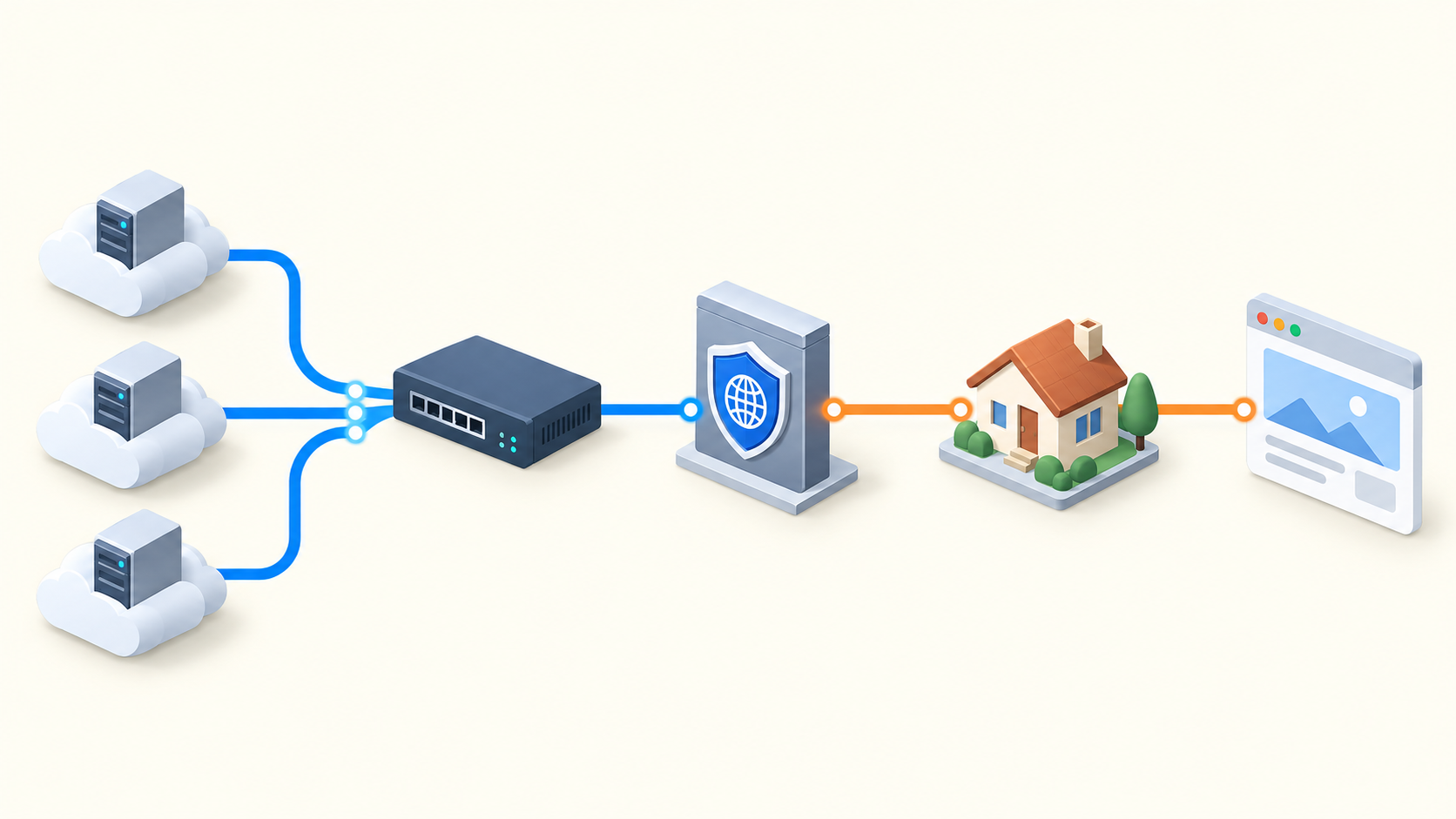
Separate three addresses
The worker may have a private address inside its network. A public egress address can identify the connection arriving at the proxy gateway after NAT or other routing. The residential exit is the address the final destination observes after the proxy. These are distinct roles; their values need not match. Source-IP access control at a gateway normally concerns the arriving client's address, while a destination's allowlist concerns the exit. Confirm the actual provider rule rather than assuming.
1. Identify the failing stage
Use one bounded request to a test endpoint you own or are authorized to access. Record whether failure occurs before TCP connection, during TLS, at proxy authentication, or after reaching the destination. A timeout does not prove a whitelist rejection; a 407 indicates proxy authentication is required but does not by itself identify the configured rule. Keep provider error text and a sanitized timestamp.
2. Observe the real worker path
- Inventory each worker pool, subnet, region and network route. A container's address is not automatically its public source address.
- From the same runtime, inspect a permitted direct diagnostic endpoint with proxy variables explicitly disabled for that diagnostic only. Do not disable the production proxy or send real business data over the direct path.
- If direct diagnostics are prohibited, use authorized gateway logs or the network team's egress inventory. Do not loosen the firewall to obtain an IP.
- Repeat from each active pool and after an approved restart or failover test. Record observed public source addresses and route identifiers, not secrets.
- Confirm what the proxy gateway itself observes. A diagnostic endpoint and proxy gateway may follow different routes, so the former is supporting evidence, not definitive proof.
3. Compare evidence with the configured whitelist
Ask the authorized owner to compare observed client sources with the current exact-IP or supported range entries. Check whether a second NAT path, address family, VPN or outbound gateway explains intermittent failure. Do not assume IPv4 and IPv6 rules or range notation are supported identically. Shared NAT can place several workloads behind one allowed address, so consider who else can use that route.
Make access-control changes only through your organization's authorized process. Keep entries as narrow as practical and use a dedicated test workload. Do not add an entire provider network or disable authentication merely to make the test pass.
4. Choose an access method that matches your deployment
98IP presents both account-password and whitelist access modes for dynamic residential proxies. Review the current dynamic residential proxy product and interface documentation before choosing. A stable, controlled public source may suit source-IP authorization. When sources change frequently, evaluate a supported credential-based method with secret management instead of continually widening IP access. Neither method makes the residential exit permanently fixed.
Confirm current platform limits and instructions with support; this guide does not claim a particular range format, update delay or enforcement behavior for 98IP. Its products are intended for overseas network environments. Validate that your cloud deployment is eligible.
5. Run positive and negative checks
After an approved correction, make one request from an authorized worker and verify the expected response. Then, using only a designated test host and the authorized test plan, verify that a non-authorized source is refused. Repeat after a planned restart and from every intended pool. Record the source observed by the gateway, successful proxy connection, destination response and any exit change as separate fields.
FAQ and support checklist
Can I copy an IP from a page loaded through the proxy? That page generally observes the proxy exit. It is not reliable evidence of your worker's source at the proxy gateway.
Why does access fail only sometimes? Compare worker pools and actual routes before concluding. Multiple outbound paths can expose different sources, but connection, credential and destination errors remain separate possibilities.
Does purchasing static residential IP fix source authorization? Not automatically. A fixed destination-visible exit and a controlled client source solve different problems.
Provide support with sanitized error text, timestamps, client version, access mode, worker pool and authorized egress evidence. Do not send passwords, tokens or raw packet dumps containing secrets. Consult the 98IP operation guides for related setup checks. Test only authorized systems, preserve certificate verification and avoid changing unrelated security controls.
Related Recommendations
- Proxy Concurrency Saturation Test: Find the Safe Throughput Knee
- POST Timeout Through a Proxy: Prevent Duplicate Submissions
- How to Test gzip and Brotli Integrity Through a Proxy
- How to Audit Proxy Geolocation Database Freshness Before a Regional Launch
- How to Test GeoDNS Consistency Across Proxy Markets
- SOCKS5 Remote DNS Verification: Test Resolution Before You Scale
- How to Test a Proxy for DNS Leaks Before You Buy
- Regional Proxy Hreflang Validation: Check the Whole Language Cluster
- Residential Proxy Crawl Scope: Check URLs Before They Enter the Request Queue
- How to Test a Multi-Region Proxy Routing Policy Before Production