
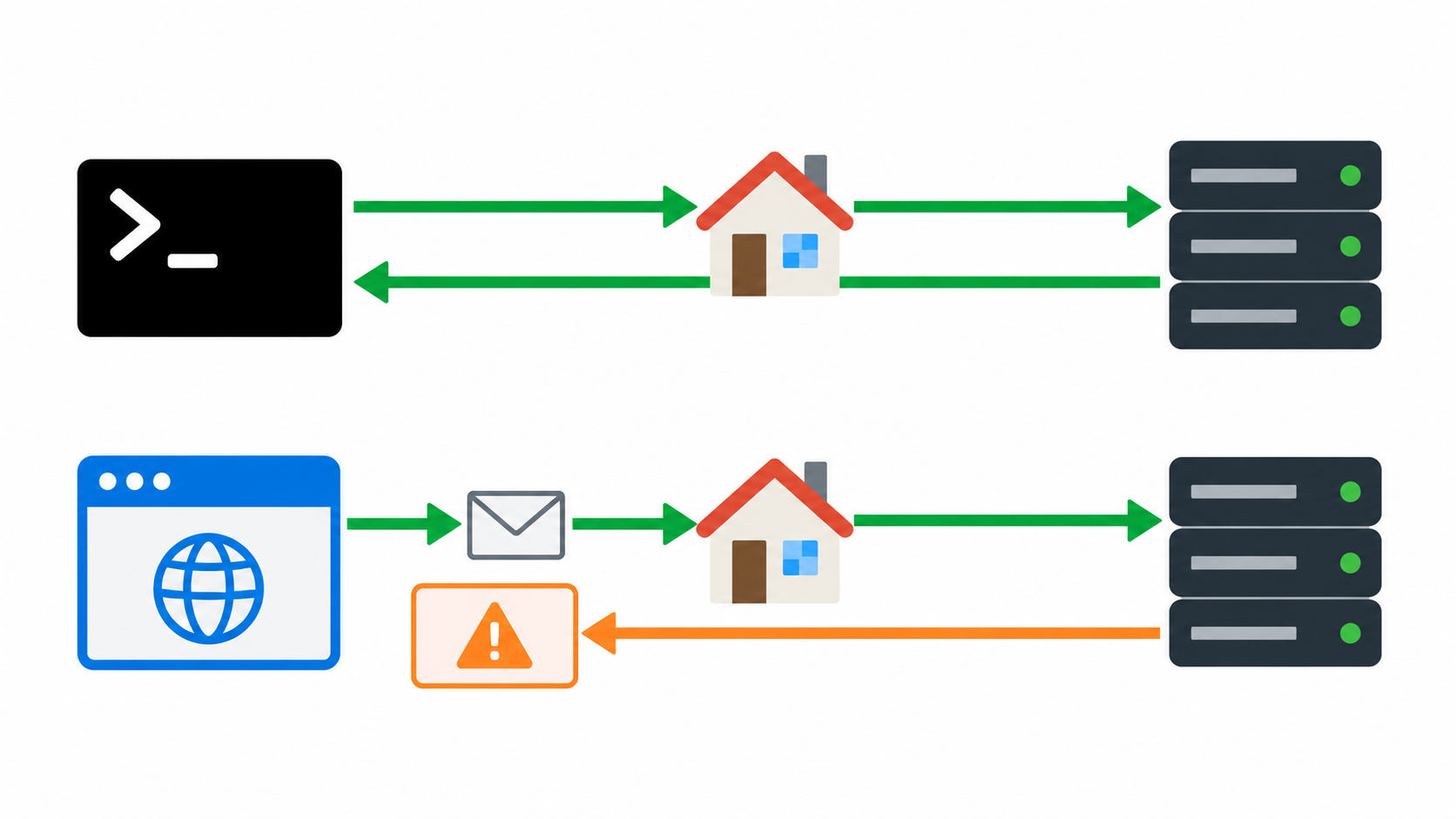
Your command-line request returns data through a residential proxy, but a web application's request fails. Buying a new proxy is premature: a successful transfer and browser permission to expose the response are different checks. For an API and frontend you own or are authorized to test, compare the browser's actual request with its command-line counterpart before changing network resources.
Understand the two acceptance gates
The proxy must transport the connection successfully. Separately, the browser applies cross-origin rules to a request from one origin to another. An origin is defined by scheme, host and port. A command-line client does not reproduce the browser's CORS enforcement simply by fetching the same URL. The browser console message is a clue, not a complete diagnosis.
1. Make the comparison controlled
- Choose an owned staging page and a harmless API operation. Record frontend origin, API URL, browser version, application build and proxy access mode.
- Verify that both clients use the intended proxy route. A browser setting and a shell proxy setting are separate configurations; check sanitized gateway or destination evidence.
- Keep method, relevant headers, content type and intended credential mode consistent. Remove production tokens from copied commands and exported network logs.
- Use a clean browser context and test account. Change one factor at a time; do not simultaneously change region, browser version and application code.
2. Inspect the browser's network sequence
Open developer tools before issuing the request. Find whether an OPTIONS preflight occurs, whether it reaches your API, and whether the later application request is sent. Some requests do not require preflight, so its absence alone is not a failure.
If preflight cannot connect, classify DNS, TCP, TLS and proxy authentication first. If it reaches the API but the application request is not sent, have the API owner compare the response with the requested origin, method and headers. If the actual response arrives but the browser blocks script access, inspect the applicable response headers and credential mode. Preserve status and sanitized request identifiers, not secret-bearing request bodies.
3. Check your API rules rather than disabling the browser
Compare the allowed origin with the frontend's exact scheme, host and port. Confirm allowed methods and headers for the operation. Credentialed browser access cannot use a wildcard allowed origin as a substitute for the specific authorized origin. Review the actual response as well as the preflight; a successful preflight is not enough to prove the final response is usable.
Make corrections only on an API you control through its approved configuration process. Do not disable browser security, install an untrusted CORS extension or broadly allow every origin to make a test green. Those changes hide the problem and alter the security boundary.
4. Use a region matrix to find routing-dependent behavior
Repeat the same harmless case in two approved regions. Compare the API backend or CDN branch, response status and relevant headers. A region-specific failure may arise from your deployment or cache rules, but the evidence must establish that difference. An HTTP error without the expected CORS headers can appear to the application as a CORS failure; diagnose the underlying error too.
98IP dynamic residential IP is relevant when you need authorized regional viewpoints for this comparison. Select current country options and verify actual routing. It cannot repair your API's CORS configuration, and this guide makes no guarantee about a particular browser integration. Refer to the operation guides for setup and current restrictions. 98IP products are intended for overseas network environments.
FAQ and release checks
Does a successful curl response prove the browser should work? No. It confirms a transfer under that client's conditions, not browser cross-origin permission.
Should every request contain OPTIONS? No. Preflight depends on the browser request; test the actual operation.
Will a static IP fix CORS? Not by itself. Consistent routing and correct origin permissions solve different problems.
Accept a correction only after the approved origin can read the intended response, required preflight and actual responses match the specification, and an authorized negative test for a disallowed origin remains denied. Cover each intended region, keep certificate verification enabled and retain only sanitized evidence. Do not test or alter third-party controls without permission.
Related Recommendations
- Is the Proxy Failing—or Is the Target Throttling You? A Control-Route Test Plan
- How to Troubleshoot Proxy Authentication and 407 Errors with curl
- Same File Will Not Retry Through a Proxy? Test Selection, Cancel and Clear
- Market Selector Opens but Keyboard Users Get Stuck? Test Focus Through Regional Proxies
- Script Returns 200 but Will Not Run? Diagnose MIME Types Through a Proxy
- How to Normalize IPv4-Mapped IPv6 Addresses in Proxy Logs
- Residential Proxy Evaluation Checklist: 7 Tests to Run Before You Buy
- The ZIP Opens After a Proxy Download: Are All Export Files Really There?
- RTL Product Codes Look Reversed? Test Identifier Boundaries Through Regional Proxies
- How to set a computer to access the Internet with static IP? Here are the detailed steps